
Key Fob Not Working After Battery Change? 5 Steps to Fix It

Updated: Sep 14
You just spent ten dollars on a fresh lithium battery and carefully snapped the plastic casing back together, yet your car remains completely unresponsive. It is a common, high-stress scenario that leaves many drivers feeling like they have wasted their money or, worse, are about to be stranded. If you are dealing with a key fob not working after battery change, the issue often goes beyond simple power. A dead battery is rarely the only failure point; restoring a modern remote requires a methodical check of physical seating, internal contacts, and digital synchronization.
We understand the anxiety that comes with electronic security failures and the fear of high dealership replacement costs. You don't necessarily need a new fob or an expensive service appointment to get back on the road. This guide provides a professional diagnostic process to help you identify exactly why your remote is failing and how to fix it yourself. We will cover five essential steps, from verifying battery orientation to resyncing the 128-bit AES encryption that keeps your vehicle secure. By the end of this article, you'll know if your fob is truly broken or just needs a technical reset.
Table of Contents
Common Battery Replacement Mistakes and Simple Fixes
Finding your key fob not working after battery change is a common frustration that often stems from a simple physical oversight rather than a total hardware failure. Before you assume the internal circuit board is fried, you must verify the most basic component: the power source itself. Most modern vehicles utilize a Remote Keyless System that requires a precise voltage threshold to transmit encrypted signals. If that power is interrupted by a minor installation error, the car will remain unresponsive.
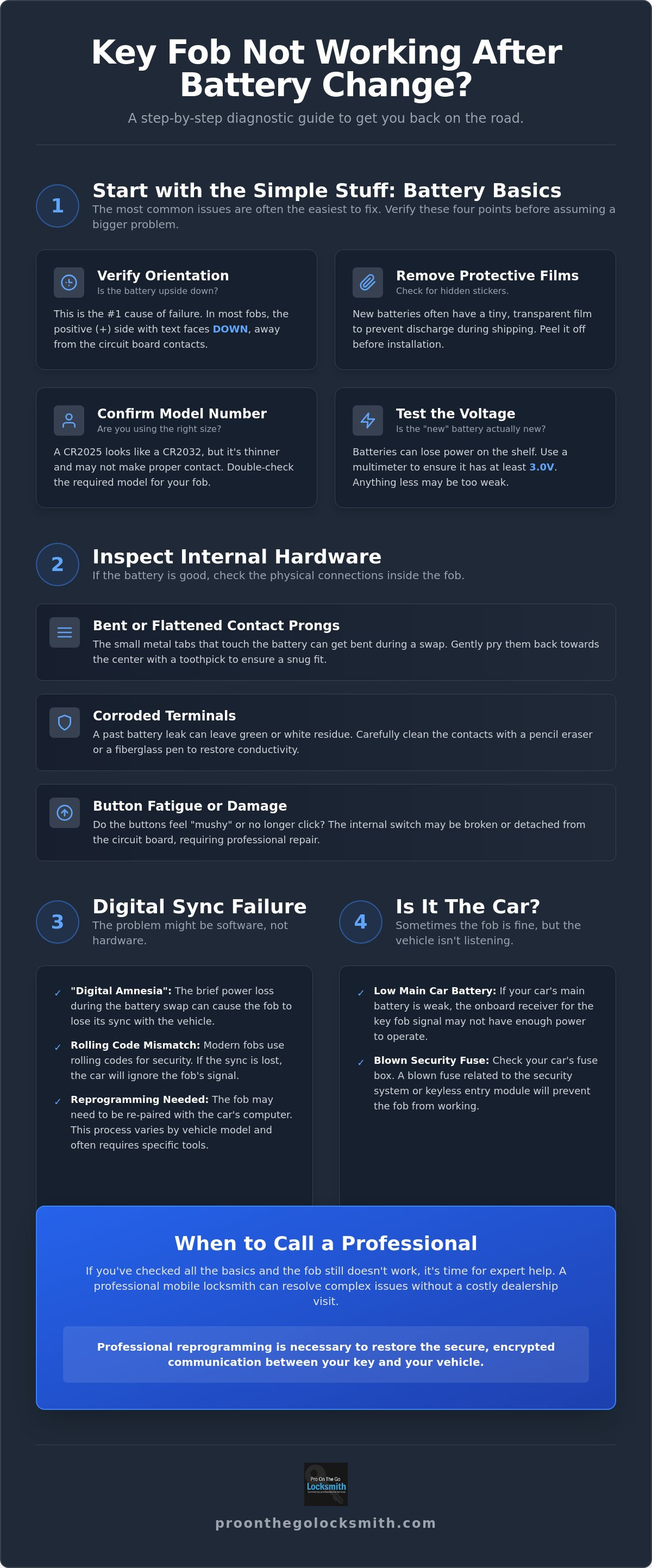
Follow this diagnostic checklist to rule out the most frequent installation errors:
Verify Orientation: Match the positive (+) and negative (-) symbols on the battery with the markings engraved on the plastic fob casing.
Remove Protective Films: Inspect the bottom of the new battery for a transparent sticker or film that prevents discharge during shipping.
Confirm the Model Number: Ensure you aren't using a CR2025 in place of a CR2032; while they look identical, the thinner CR2025 may not maintain a snug connection.
Test the Voltage: Use a multimeter to check the "new" battery. It's not uncommon for batteries to sit on a store shelf until they drop below the 3.0V required for operation.
The "Upside Down" Factor
It sounds elementary, but a 180 degree flip is the leading cause of a non-responsive remote. In the majority of modern fobs, the positive side (the smooth side with the branding and model number) usually faces down toward the back of the casing. Look for small metal "fingers" or a stamped (+) sign in the battery tray to guide you. If you've installed the cell backward, the circuit remains open, and no signal can be sent to the vehicle's receiver. Simply flipping the battery and ensuring it clicks firmly into place often provides an immediate resolution.
Battery Quality and Protective Coatings
Beyond simple orientation, the chemical surface of the battery can be a silent culprit when your key fob not working after battery change persists. Many premium battery manufacturers now apply a bitterant coating to their button cells to discourage children from swallowing them. This non-conductive layer can occasionally interfere with the sensitive metal contact prongs inside your fob. If you suspect this is the case, dampen a cotton swab with a small amount of isopropyl alcohol and gently wipe both sides of the battery. This removes any residues or oils from your fingertips that might be creating resistance. Always opt for name-brand lithium cells over bulk-buy generic alternatives, as generic options often suffer from inconsistent thickness that leads to intermittent connectivity issues.
Internal Hardware Issues: Beyond the Battery
If your key fob not working after battery change persists despite using a fresh cell, the physical connection between that battery and the circuit board is likely the culprit. Key fobs endure significant daily wear. They are dropped, crushed in pockets, and exposed to varying temperatures. These stressors can lead to internal mechanical failures that no amount of battery power can overcome. Before assuming you need a total replacement, perform a visual inspection of the internal housing.
Look for these specific indicators of hardware failure:
Corroded Terminals: Metal contacts with green or white powdery residue indicate a past battery leak.
Bent Prongs: Contacts that appear flattened or pushed away from the battery tray prevent power flow.
Button Fatigue: Internal switches that feel "mushy" or no longer produce a distinct click often indicate they've detached from the board.
Liquid Ingress: Oily residue or dark spots on the green circuit board suggest water or oil damage.
Repairing Bent or Corroded Terminals
A common reason for an unresponsive remote is a loss of tension in the metal tabs. When you remove an old battery, it's easy to accidentally snag a prong, bending it just enough to prevent a solid connection with the new cell. You can often fix this by using a small flathead screwdriver or a toothpick to gently pull the metal tabs back toward the center of the battery compartment. The goal is to create enough tension so the battery doesn't rattle once the casing is closed.
If you spot minor corrosion from a leaking old battery, avoid using harsh chemicals. A fiberglass pen or even a simple pencil eraser can safely scrub away oxidation without damaging the plating. Be extremely careful during this process. These components are delicate, and excessive force can snap the metal. If the damage is too severe for a DIY fix, seeking professional Car Key Replacement is the most reliable way to restore access.
Identifying Broken Solder Joints
Modern fobs are essentially miniature computers. Dropping your keys on concrete can cause a hairline fracture in the solder joints connecting the battery terminal or the buttons to the Printed Circuit Board (PCB). If you hear a faint rattling when you move the fob, perform the "shake test." If components are loose inside, the electrical circuit is broken, and the fob cannot transmit a signal.
In some cases, a car key not detected error message on your dashboard points to this exact type of hardware failure. While you might find guides on how to program a key fob, no amount of software syncing will fix a physically broken connection. If the internal switches have detached from the PCB, the remote is effectively dead. A specialized technician can often diagnose these frequency issues on-site, saving you from a costly dealership replacement.
Why Fobs Lose Their Memory: Re-synchronization and Programming
A key fob not working after battery change isn't always a hardware or power problem; it's often a communication breakdown. Modern vehicles use rolling code technology to prevent signal interception. Every time you press a button, the fob and the car generate a new encrypted code in a specific sequence. If you press the buttons while the battery is dead or out of the device, the fob's counter can get out of sync with the car's receiver. When you finally install the new cell, the car rejects the signal because the code doesn't match the expected sequence.
Some vehicle brands are more susceptible to this "digital amnesia" than others. European manufacturers, particularly BMW and Volkswagen, often design their systems to de-authorize a remote if it remains unpowered for more than a minute or two. During a key fob battery replacement, speed is essential to maintain the volatile memory. If the synchronization bit is lost, the fob becomes a "paperweight" until it is reintroduced to the vehicle's computer. This process varies in complexity, ranging from simple button-press sequences to deep automotive key fob programming that requires specialized diagnostic tools.
DIY Re-synchronization Methods
Before calling for help, try these common manufacturer resets. For many domestic and Japanese models, the "Key in Ignition" method is the standard. Insert your physical key into the ignition and cycle it from the OFF position to the ON position (without cranking the engine) several times in quick succession. Usually, the door locks will cycle to signal that the car is in pairing mode. For push-to-start vehicles, look for a hidden emergency slot. This is often located in the center console, the glove box, or on the side of the steering column. Placing the fob in this slot allows the car to read the chip directly and often restores the wireless link automatically.
When the Fob Needs Professional Reprogramming
If DIY methods fail, the vehicle's Immobilizer Control Unit may have completely purged the fob's ID from its active list. This happens most frequently when a battery has been dead for weeks or months. It's important to understand that remote entry and engine starting are separate systems. Your fob might successfully start the car when held against the start button via a passive induction coil, yet still fail to lock or unlock the doors wirelessly. When the digital handshake is broken at this level, a technician must plug into the OBD-II port to manually re-pair the device. This ensures the 128-bit encryption is properly aligned without the risk of locking yourself out of the system entirely.
Is the Car the Problem? Troubleshooting the Vehicle Side
Sometimes, a key fob not working after battery change has nothing to do with the remote itself. If you've already verified the fob's battery orientation and checked for internal hardware damage, the failure point likely resides within the vehicle's electrical architecture. Modern cars are highly sensitive to voltage fluctuations. If the vehicle's main battery is weak, the onboard computer may prioritize essential engine functions while disabling "non-essential" convenience features like remote keyless entry. It's a protective measure that often catches drivers off guard.
Before assuming the fob is faulty, consider these vehicle-side failure points:
Main Battery Voltage: A car battery with low charge can disable the security receiver to save power.
Blown Security Fuses: A surge can pop the fuse responsible for the keyless entry module.
RF Interference: Nearby radio towers or high-powered electronics can jam the signal.
BCM Malfunction: The Body Control Module may need a hard reset to recognize the fob again.
The Role of the Vehicle Battery
A common misconception is that a car battery is either "working" or "dead." In reality, a battery can have enough amperage to slowly crank the engine but not enough voltage to power the sensitive security modules. When voltage dips below a specific threshold, the Body Control Module (BCM) might ignore signals from your remote to conserve energy. Look for secondary symptoms like dimming interior lights, slow power windows, or a dashboard clock that resets itself. You can test this theory by using your spare key. If neither fob works, the car's receiving antenna or main power source is the likely culprit.
Fuses and Modules
Electronic security systems rely on dedicated circuits protected by fuses. If your remote remains unresponsive, locate the interior fuse box. Consult your owner's manual for fuses labeled "Security," "Keyless," or "BCM." A single blown fuse can render a perfectly programmed fob useless. Beyond fuses, the BCM acts as the brain of your car's security. While a DIYer can check a fuse, a professional technician uses advanced scan tools to communicate with the BCM directly. These tools reveal if the car is actually receiving the RF signal but failing to act on it. If the issue is so severe that you cannot turn the ignition even with the physical blade, you may need a specialized car ignition repair to restore functionality.
If your car's security system has stopped responding to a verified remote, our team provides on-site diagnostics to find the root cause. Contact us for professional Key Fob Programming in Tampa to resolve these complex electronic failures without the need for a tow.
Professional Key Fob Solutions in Tampa
If you find your key fob not working after battery change even after following our diagnostic steps, the issue likely involves a deeper encryption failure or a complex hardware defect. While dealerships often suggest towing your vehicle to their service center, this is an unnecessary and costly hurdle. A professional mobile locksmith provides a more efficient alternative by bringing the diagnostic lab directly to your location. We utilize specialized Radio Frequency (RF) testers to verify if your remote is actually transmitting a signal, which rules out internal hardware failure immediately.
For owners of 2026 vehicle models, our technicians use advanced programming interfaces designed to handle the latest 128-bit AES encryption standards. This localized, neighborly approach ensures you don't spend hours in a dealership waiting room or pay inflated service fees. We focus on restoration and precision, ensuring your vehicle's security system is perfectly aligned with your remote.
Mobile Diagnostics: We Come to You
Our mobile service eliminates the high-stress logistics of being stranded. When we arrive at your driveway in Tampa, we perform a comprehensive signal analysis on smart keys, proximity fobs, and traditional transponders. If the remote is transmitting but the car remains unresponsive, we can perform on-site mobile car key replacement or reprogramming without moving the vehicle. This "no-tow" benefit saves both time and money, providing a pragmatic resolution to even the most complex digital lockouts.
Restoring Security and Peace of Mind
Professional intervention does more than just get the buttons working again. When we re-sync your system, we can wipe any old or lost keys from the vehicle's memory. This ensures that only the remotes in your possession can access or start the car. We prioritize transparency by using high-quality OEM or certified aftermarket fobs that meet the manufacturer's exact specifications. Pro On The Go Locksmith is a licensed specialist (Florida license #HCLOC23013) dedicated to the evolution of digital security.
If you're ready to stop guessing and start driving, Contact Pro On The Go Locksmith for Tampa Key Fob Service today. We have a plan to restore your access quickly and professionally.
Restore Your Vehicle Access Today
Resolving the frustration of a key fob not working after battery change comes down to precise diagnostics. By systematically checking battery orientation, internal terminal tension, and the digital synchronization between your remote and the Body Control Module, you can identify the exact failure point. Most issues are solvable without a trip to the dealer if you follow the logical diagnostic path covered in this guide. Whether the problem is a simple physical oversight or a complex rolling code error, understanding these systems empowers you to avoid unnecessary dealership markups.
If your remote remains unresponsive, professional calibration is the most reliable next step. Pro On The Go Locksmith provides expert mobile service across Tampa, eliminating the need for a tow truck. As a Licensed Florida Locksmith (#HCLOC23013), we maintain specialized equipment to handle all major car brands and advanced security protocols. We prioritize your time and safety by delivering on-site results that restore your peace of mind. Don't let a technical glitch keep you off the road. Get Professional Key Fob Programming in Tampa Now and regain full control over your vehicle's security.
Frequently Asked Questions
Why did my key fob stop working even with a new battery?
Internal debris or worn button contacts are often the culprit when a key fob not working after battery change occurs despite a fresh cell. Over time, dust and skin oils penetrate the casing and coat the conductive pads on the circuit board. This creates a barrier that prevents the button press from completing the electrical circuit. Cleaning the board with specialized electronic cleaner often restores the connection immediately.
Do I need to reprogram my key fob after changing the battery?
Reprogramming is typically unnecessary for most domestic vehicles if the swap is performed quickly. However, a key fob not working after battery change is common in European luxury brands like BMW or Audi, which may purge the remote’s "rolling code" from memory if left without power for more than a few minutes. In these cases, a professional software sync is required to re-establish the encrypted handshake.
How do I know if my key fob is actually broken?
The most accurate way to verify a broken fob is by using a signal tester to check for an active Radio Frequency (RF) transmission. Most professional locksmiths use these handheld devices to see if the fob is "talking" to the car. If the tester detects a strong signal on the correct frequency but the car doesn't respond, the issue lies with the vehicle's receiver or the programming rather than the fob’s hardware.
Can a locksmith program a key fob that I bought online?
Most locksmiths can program aftermarket fobs bought online, provided they operate on the exact frequency required for your vehicle's make and year. It's important to verify that the FCC ID on the back of the online fob matches your original remote. Be aware that some cheap aftermarket fobs use inferior chips that may fail to hold a program or lack the 128-bit AES encryption found in modern smart keys.
What is the cost to have a key fob professionally programmed in Tampa?
Professional programming costs vary based on your vehicle's make, model, and the complexity of its security encryption. Factors such as whether you have an existing working key or if it's an "all keys lost" scenario will also influence the final price. Choosing a mobile locksmith in Tampa is generally more cost-effective than a dealership because it eliminates the need for expensive towing and high service center labor rates.
My car won’t start but the remote works—what is wrong?
A car that won't start despite the remote working usually indicates a failure in the transponder chip system. The buttons that unlock your doors and the chip that starts your engine often operate on separate circuits. If the transponder chip is damaged or loses its programming, the car's immobilizer will prevent the engine from cranking even if the doors are unlocked. This requires a professional diagnostic tool to repair the link.
Will a dead car battery cause my key fob to stop working?
Yes, a completely dead vehicle battery prevents the car's onboard receiver from recognizing or acting on any incoming fob signals. If your car has no power, the Body Control Module cannot process the "unlock" command sent by your remote. Before assuming your fob is broken, check if your headlights or interior lights turn on. If the car's electrical system is dark, you likely need a jump start rather than a new key.
How long should a key fob battery typically last?
A standard key fob battery typically lasts between three and four years under normal usage conditions. Proximity fobs and smart keys that stay in constant communication with the vehicle tend to drain faster, often requiring a swap every two years. If you notice a significant drop in signal range or have to press buttons multiple times to get a response, it's time to proactively replace the lithium cell.
If the fob still does not work, schedule professional key fob programming in Tampa with a mobile locksmith.


